Autocomplete Basic Idea
For an autocomplete, the form generally displays an empty text-box. As the user types something, an options open below the text-box with the suggestion. The options are hidden div or span element which becomes visible once user start to type anything.
For basic understanding let us create the autocomplete HTML with this hidden element visible and rather than sending the data while typing, we will send the detail on click of the button. The Javascript and coding are not clean and we will improve as we will progress with the tutorial. Certain Browser offer their own Autocomplete feature which shows a dropdown of previously entered text. To stop this default nature we are using AUTOCOMPLETE="off".
(A) AUTOCOMPLETE HTML
<form name="autcomplete_form" AUTOCOMPLETE="off" ID="autcomplete_form">

  AutoComplete Text Box: <br/>

  <input type="text" name="autocomplete_value" id="autocomplete_value" style="width:500px;"/>

  <div style="border:1px solid;margin:0;padding:0;width:500px;" id="dropdown">The AJAX Autocomplete data will come here but you will not be able to select it !<br/>

  Write something of 3 characters to search for and press the "AUTOCOMPLETE" button.</div><input type="button" value="AUTOCOMPLETE" onclick="ajax_autocomplete();"/></form>
I have left comments for almost every line on Javascript and hence not explaining much about it.
(B) AUTOCOMPLETE JAVASCRIPT
<script type="text/javascript">

function ajax_autocomplete(){

//Get the text from the text-box

var matter=$("autocomplete_value").value;


//Make the AJAX Call

//Send the data to the PHP page "aj_autocomplete-example.php"

//The returned data will be displayed in the div with id "dropdown"

//While the AJAX data is send/received keep the user informed with text "autocompleting.."

callAHAH("aj_autocomplete-example.php?p=1&m="+matter,"dropdown","autocompleting..")

}</script>
The page does not do much. You type few words and rather then the script automatically sending the text you click the "AUTOCOMPLETE" button. The button once clicked gets the text in the text box.
There is no particular CSS necessary now.
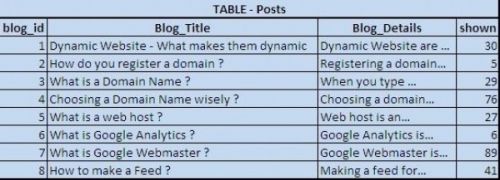
The backend for getting Server data from the database is done in PHP. Presently we are returning the blog title of every topic. You can add more security measures and for tutorial purpose I am keeping it simple. The variable "$con" stores the database connection details.
(C) AUTOCOMPLETE PHP
<?php

$con = @mysql_connect($host,$user,$pwd);

$matter=strip_tags(mysql_real_escape_string($_GET["m"]));

$query_t="SELECT Blog_Title FROM Posts WHERE Blog_Title LIKE '%$matter%'";

$result_t= @mysql_query($query_t,$con);

if(mysql_num_rows($result_t)>0)

{while($mydata_t = @mysql_fetch_array ($result_t)){echo stripslashes($mydata_t['Blog_Title']).'<br/>';}}

else {echo '<span class="errors">Nothing Found</span>';}

?>
There is no fixed way for making AJAX calls and your script may vary.
You can see the demo at https://www.jahajee.com/e/ajax-autocomplete/EXAMPLE/