
Footer Link in PHP
We will generate the complete footer link in PHP simply to include the footer link on every page as an external file.
Footer link for various Social network websites can be confusing. Facebook and twitter can show the number of subscribers and followers respectively. Some even show the Facebook like button in footer for connecting in one click. I am avoiding such links simply because facebook or Twitter either use javascript or Iframes to show the extra data, this delays the load time of your webpage. I am using the URL of my account to allow users to connect to me. While this may be one click extra for the users, it allows you to design the footer links as you want.
The "JAHAJEE" footer link are simple links to the relevant pages of the website.
The footer link for the 3rd Column (MOST VIEWED) will be generated using PHP, a server side language. For tutorial purpose a basic "Posts" table is used and its structure is attached below. A very basic PHP code using MySQL database can be done as shown below.
Everytime a blog post is viewed the "shown" count is increased for that blog_id. What we are doing is, arranging the posts as per the "shown" count and limiting it to maximum 5 posts only.
The 5 most viewed footer link is saved in a PHP variable $column3_links for later use.
We will enclose each section in a <div> tag with the relevant links in it. The div tag will be given a particular class name (lets call it "footer_div") so that we can use CSS to design them and show them in different section as we want. The complete footer will be saved as "footer.php" and will be included in every file at the end of the page. The below code can also be used without PHP, but in that case "most viewed post" needs to be replaced by somthing static as per your requirement, also the code then will be placed manually at every page where the footer is required.. I am giving the code relevant to jahajee.com you need to change the link as required.
<?php

//The footer.php

//$con_data will be your Database connection setting

//Select max 5 posts which are having most viewed (shown)

$query="SELECT DISTINCT Blog_Title,blog_id FROM Posts ORDER BY shown DESC LIMIT 5";

$result= @mysql_query($query,$con_data);

while($footer_link = @mysql_fetch_array ($result))

{

$title=$footer_link['Blog_Title'];

$id=$footer_link['blog_id'];

$column3_links .="<a href='/url-to-post/$id'>$title</a><br/>";

}

?>

<div class="footer_div">

<u>FOLLOW</u><br/>

<a href='http://feeds.feedburner.com/Jahajee?format=html'>Subscribe</a><br/>

<a href='/user/JAHAJEE/'>JAHAJEE</a><br/>

<a href='https://twitter.com/JAHAJEEcom'>Twitter</a><br/>

</div>

<div class="footer_div">

<u>JAHAJEE</u><br/>

<a href='/about/'>About Us</a><br/>

<a href='/termsofservice.php'>Terms of Service</a><br/>

<a href='/privacypolicy.php'>Privacy Policy</a>

</div>

<div class="footer_div">

<u>MOST VIEWED</u><br/>

<?php

//Print the footer link of the most viewed post

echo $column3_links ;

?>

</div>

<div class="clear"></div>
Note the extra div in the end with the class defined as "clear", we will talk about it in the later comment where we will start with CSS and give it simple shape.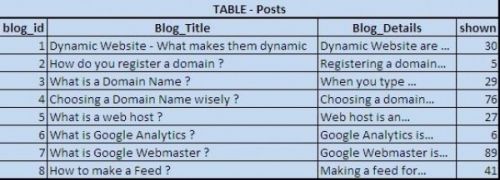
-
YOU MAY ALSO LIKE
- How to add footer for your website ?


