Hiding Whatsapp last seen Android phones
X
0 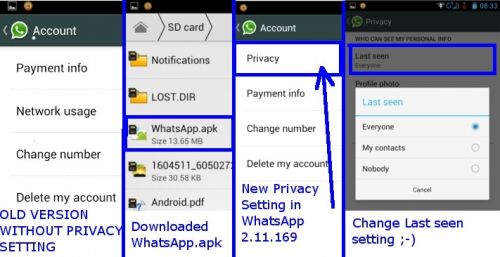

Hiding Whatsapp last seen Android phones
Now Android users can hide Whatsapp last seen. Whatsapp now allows hiding your last seen with latest version 2.11.169 available directly on whatsapp website and still not available on Google Playstore (may be available later).
So here's how you can hide whatsapp last seen on your Android phone now :
- Go to http://www.whatsapp.com/android/ and download WhatsApp.apk file to your android phone using your phone browser. If you download on your laptop you will need to transfer WhatsApp.apk file to your android device later !
- Find the downloaded WhatsApp.apk and install the latest version.
- Once latest WhatsApp version (2.11.169) is installed, open WhatsApp and browse to :
Settings >> Account >> Privacy >> Last seen
If you do not have "Privacy" Setting in your account then perhaps your update was not successful.
- Click "Last seen" and choose your favourite setting. Thats it done ;-)
 ANDROID MIXED


