
How to use Google Feedburner ?
In this post we will try to use Google Feedburner for our previously generated Atom feeds.
Before we start to use Feedburner, you should know few limitations of Google Feedburner viz :
1) Google Feedburner requires a website to have its own feed e.g. Google Feedburner will not generate the feed contents for your website. You should generate the feed and provide feedburner, URL for that feed. Please check how to make a feed for details.
2) Google Feedburner requires your feed to be lesser than 512K in size, if its more than that, reduce your content to have file size below that limit.
3) Google Feedburner will update its feed in maximum 30 minutes from your provided feed.
4) Feedburner supports following syndication formats RSS 0.90, 0.91, 0.92, 0.93, 0.94, 1.0, 2.0, and Atom.
5) You might have to redirect traffic from your site's original feed to your FeedBurner feed for correct analyzing about the subscribers.
6) Feedburner cannot be used with website with domain name having Underscore in it. So if my website is www.internet_programs.com then I cannot use Google Feedburner.
Now if you are ready to use feedburner with these limitations, then :
# Login to feedburner.google.com using your google account.
# Enter your atom feed URL in the "Burn a feed right this instant" and click "Next".
# Choose your Feedburner Feed title and Feed Address and click "Next".
# If it results in a "Congrats!" well then, congrats, you have just burned your feed and are using Google Feedburner now.
One of few extra things which you need to do now is that you need to modify the links on your website to point to the Feedburner feed so that users use feedburner to subscribe to your website feed.
So the previous meta tags and links mentioned in "Add atom feed to your website" will be modified as below :
<!-- The meta tag will become -->Hopefully this should get your website using feedburner feeds and I wish you more happy subscribers.
<link rel="alternate" type="application/rss xml" title="JAHAJEE" href="http://feeds.feedburner.com/JAHAJEE">
<!-- And the Feed link will become -->
<a href="http://feeds.feedburner.com/JAHAJEE">Subscribe</a>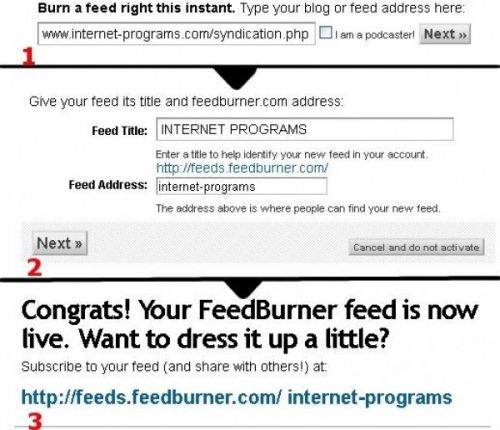
-
YOU MAY ALSO LIKE
- What is Feedburner and why to use feedburner ?
- Problem when redirecting original feed to Feedburner
When I started redirecting user from my generated Atom feed to Feedburner feed I noticed that the Google Webmaster started showing error for the submitted ... - Adsense for feeds now says Good-Bye
- Adsense for Feeds Blog says "Good Bye"
Adsense for Feeds Blog says


