
eSamudra IE Problem
Trust you know that eSamudra works only on Internet Explorer, but perhaps their programmers made it specific to some particular version only! Error "For better performance you are advised to use Internet Explorer" have been found when trying to update esamudra profile with IE 11.
Possible solution is :
- Use compatibilty mode in Internet Explorer
- try 1 version older than the present Internet Explorer.

- X
0 You can use Esamudra with Google Chrome by tweaking its user-agent setting. Thanks to Tom Alex for sharing this tutorial.Esamudra on google Chrome (zip) [465.63 KB]
- X
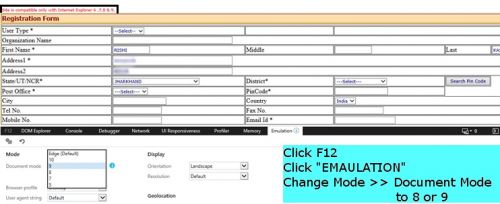
0 Recently when I did my GMDSS Renewal, I realised that I did not explain the use of compatibility mode of Internet Explorer. Like I said before DG Shipping profile will work with Internet Explorer version 7,8, 9 and 10. To know which version you are using
Click "Setting" >> "About Internet Explorer"
The popup opened will show you the version of your IE. To use the compatibility mode of IE (in simple terms making it to a lower version like IE 8 or IE 9)
- Press F12 to open Developer toolbar
- Click EMULATION
- Under Mode >> Document Mode change it to 8 or 9
-
YOU MAY ALSO LIKE
- 4 eSamudra Problems ?
- eSamudra online seafarer registration & printout problem
After completing my DG shipping online seafarer registration, I found my name shown incorrectly in esamudra profile and felt like dropping a bomb on eSamud ... - Seafarers profile on Esamudra
- MMD assessment problem with esamudra after DNS Course
- DG Shipping login problem
What if you forget your DG Shipping login credential ? Esamudra creates your profile with INDOS Number as your default DG Shipping Login ID and password a ...


